- English
- Русский
Updated to 17/12/2025 patch. (Australian time). Consider me back for a little bit. -compsoter

Created by compsoter
Maintained by compsoter, Acurrz, bonclide, dimeq, noct, monster_domosed, millie, and karebu
Hosted by .k8ict
Updated to 17/12/2025 patch. (Australian time). Consider me back for a little bit. -compsoter

Created by compsoter
Maintained by compsoter, Acurrz, bonclide, dimeq, noct, monster_domosed, millie, and karebu
Hosted by .k8ict
This is an old revision of the document!
Hey! So you discovered (or saw on a Discord channel) a new movement technique. Neat! By clicking this link, I assume you want to document the technique on the Deadlock Movement Wiki. Thank you!
Below are a bunch of general rules and resources to help you write a page or a new section of a pre-existing page. There are images (for the visual learners out there) with very large red circles (for the visually deficient people out there).
The wiki has a bit of a learning curve to start writing for (it's a lot more like writing a HTML webpage than a standard WYSIWYG software (like Google Docs)), but it should all be explained down below. If push comes to shove and what you've written isn't really up to standard, maybe I'll1) will fix it.
Wow! You're getting started. But how do I get started?
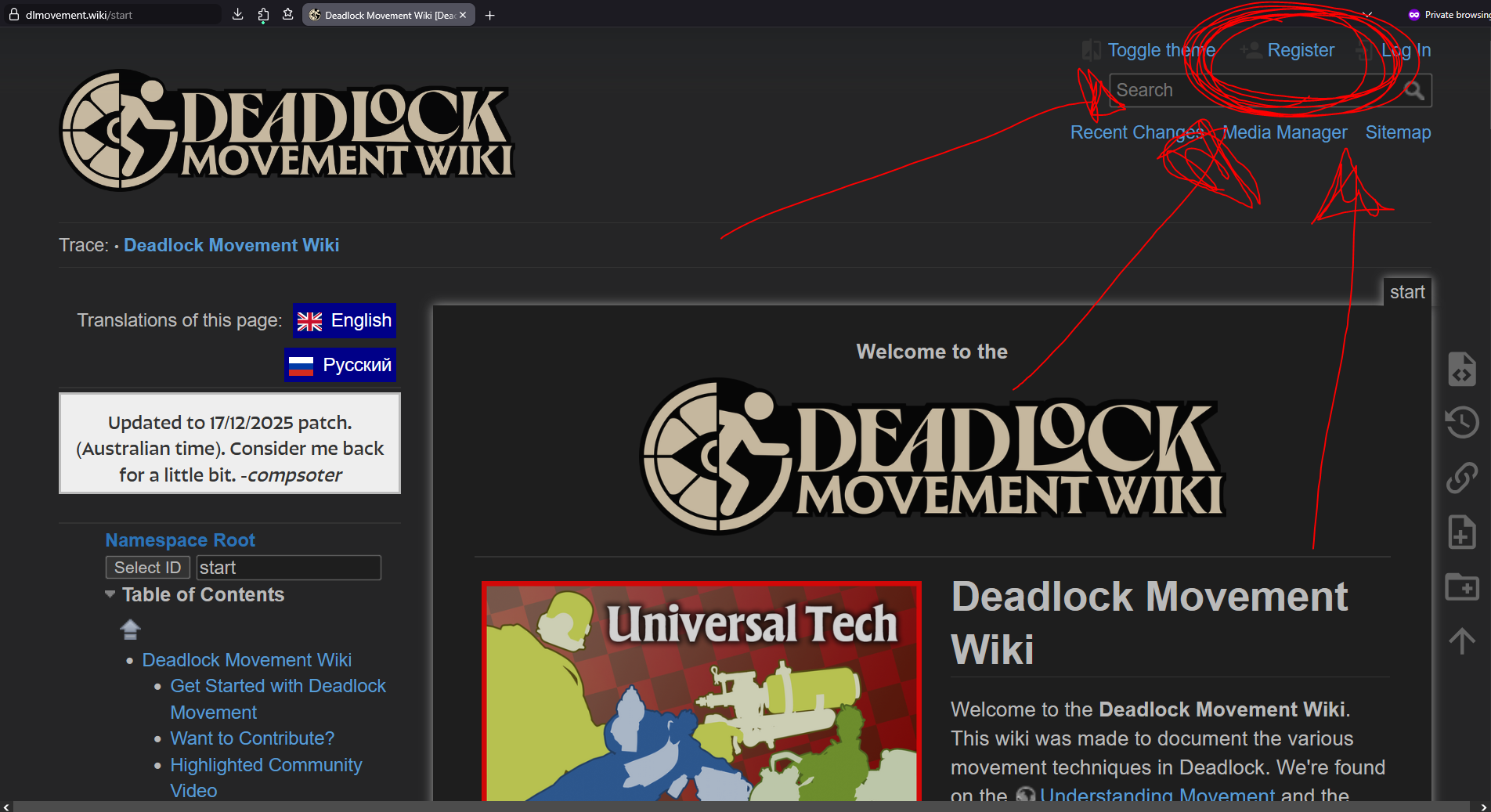
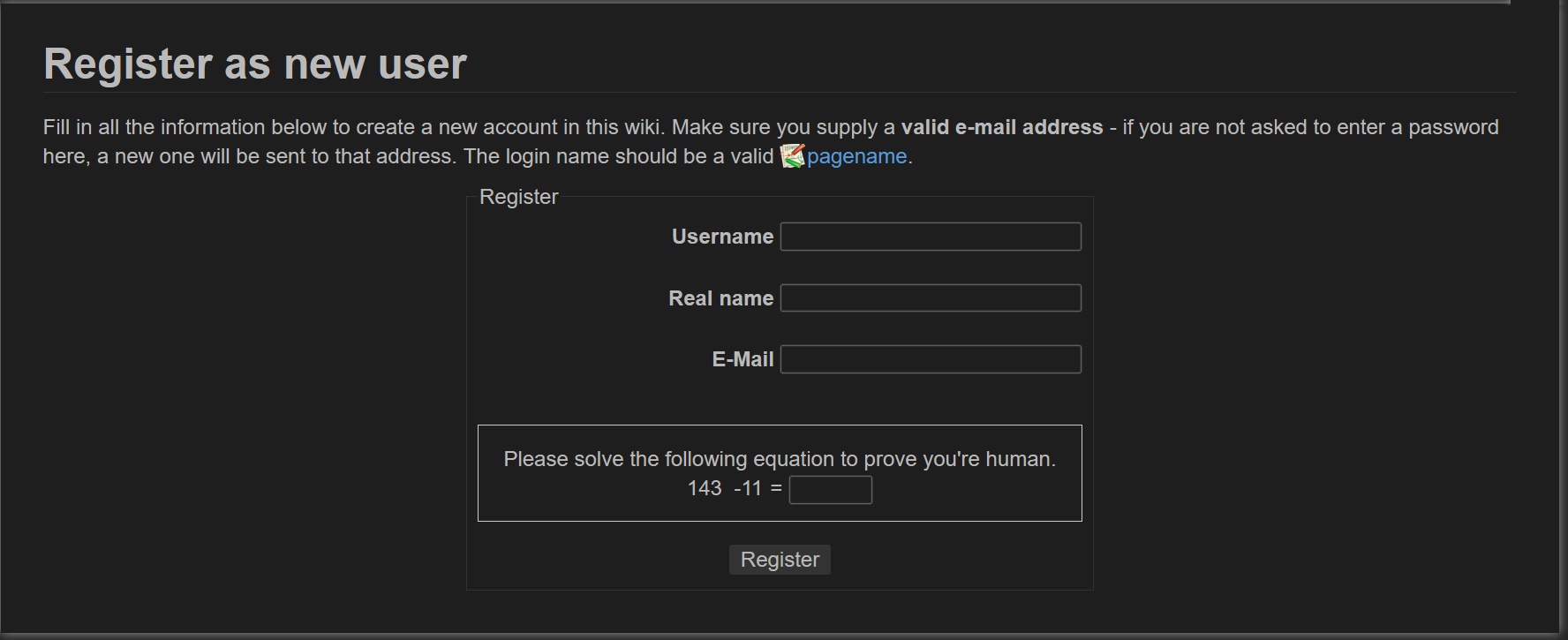
First, create an account on the Deadlock Movement Wiki. Click on the link circled in red shown below.
Then, fill out the form below. A note from the site admin; please do not include your real name, I don't want them.
Once that is done, you should receive an email and have an account. Yippee! You can now edit and upload files (including pages and images) to the wiki.
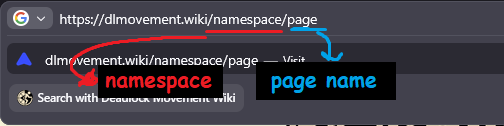
Go to your browser search bar and replace the link with what is relevant. First, you need to understand what the difference between a namespace is.
- A namespace is like a folder. For links, these are signified by the words separated by slashes preceding the last one (see the image below). A namespace can also be a page. For example, the page Stamina is in the Universal Tech namespace, and the link is dlmovement.wiki/universaltech/stamina. There is also the page Universal Tech, which has the link dlmovement.wiki/univeraltech.
hero, where character specific techniques go; itemtech, where item specific techniques go; universaltech, which is where universal techniques that can be performed by more than one character go, statuseffects which is where movement relevant status effects go, primelock which is where the Primelock Movement Wiki is located, and;viscous, which is where the wiki version of the Viscous Deep Dive is located.primelock and viscous, they have their own version of the other four namespaces (primelock has its own universaltech namespace (dlmovement.wiki/primelock/universaltech/stamina))
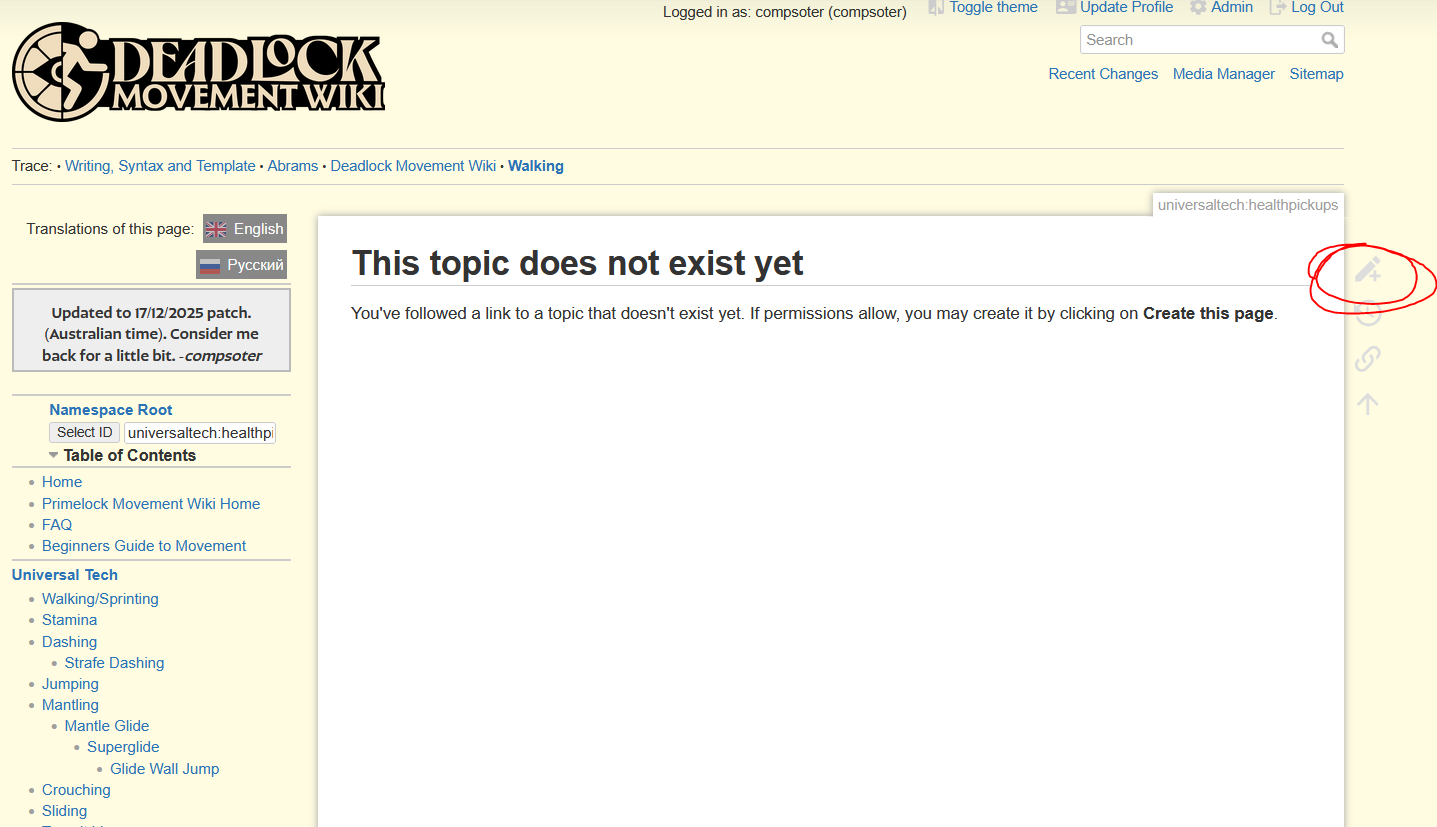
To create a page, make a new link by substituting what namespace you want and what you want the page to be named into the dlmovement.wiki link (e.g. if I wanted to create a page on health pickups in the namespace universaltech, I would type in dlmovement.wiki/universaltech/healthpickup). If the page doesn't exist yet, you'll be greeted by this page. To create a page, click on the button next to it. If the page exists, hovering over the button will say “Edit this page” instead, and the icon will be slightly different (but still at the top).
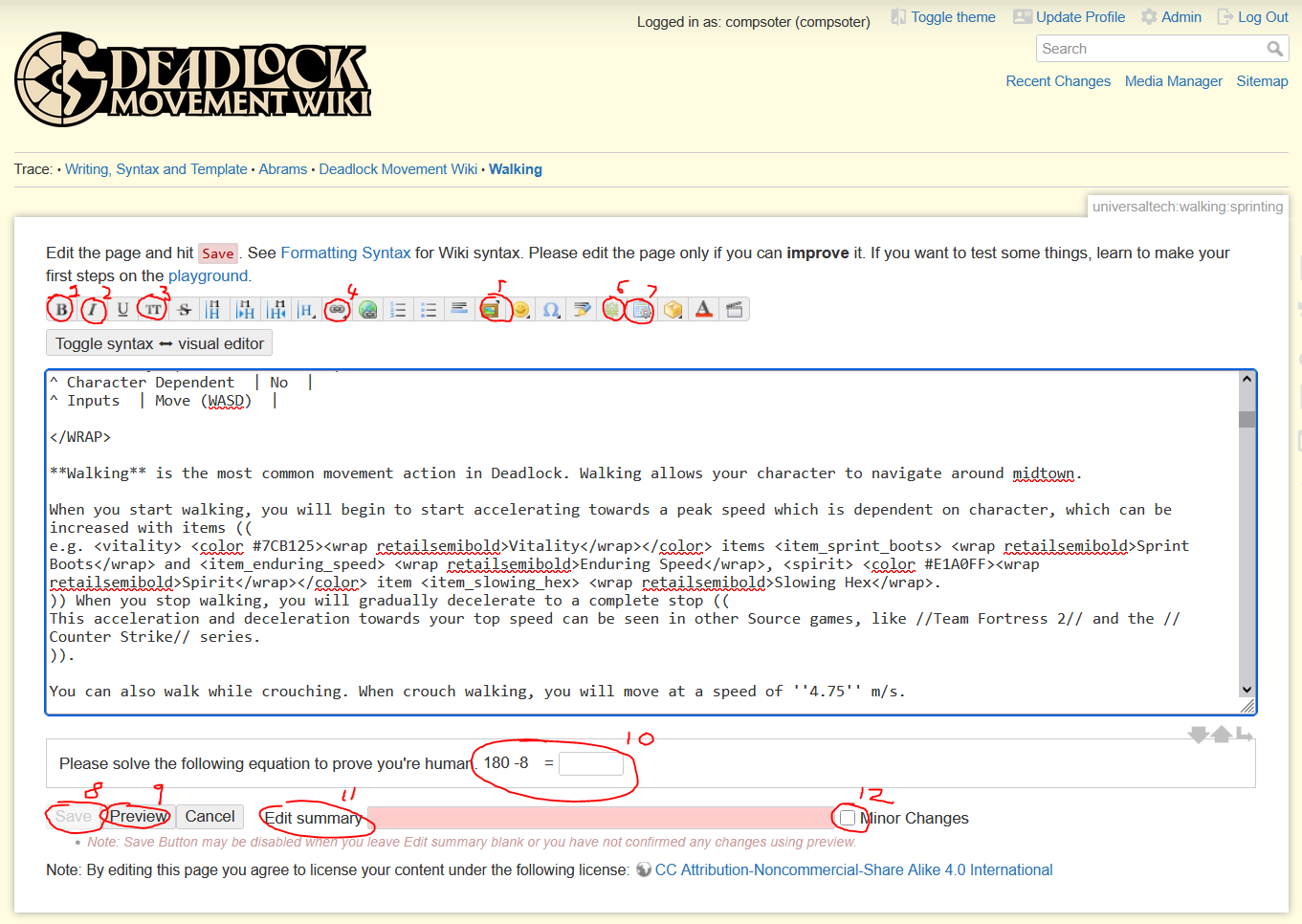
You'll be greeted by a screen that looks like this.
There are buttons on the top row; hovering over these will tell you the function of them. The most important functions are numbered;
monospaces the text selected. Clicking on it without selecting anything will create a placeholder string.Writing in the box is similar to how you type in a word processor like Word, except that it is monospaced and there is no formatting applied to it (to view formatting, you have to preview the page and scroll down). Utilising the template and adapting it to your movement technique, write about it! There are general guidelines listed below in the General writing guidelines section.
There are some additional formatting options you can use:
The wiki makes extensive use of the wrap plugin to execute its formatting. View its documentation at https://www.dokuwiki.org/plugin:wrap, or copy paste from a Deadlock Movement Wiki page. If you are writing a character tech page and want sections to be formatted separate, use the custom string <WRAP box nobox> and </WRAP> around elements; this will ensure they are spaced properly.
Once you are done, solve the maths question and press save. The edit will be published and be visible to everyone. There is no cooldown on editing a page.
There are general writing guidelines. These are loose; if a pages contents work better disregarding one of these guidelines, then it will stay.

Weapon,
Vitality or
Spirit), show the items icon then the items name in the Retail Semibold font. (e.g. the
Vitality item | Placeholder | |
|---|---|
| Placeholder | Placeholder |
| Placeholder | Placeholder |
| Placeholder | Placeholder |
| Placeholder | Placeholder |
On every article that talks about a technique that can be replicated, include a table and clip on the right. This clip should ensure the following are followed:
cl_showpos 2 (which is an sv_cheat command) is enabled in the console.new_player_basics). If the tech cannot be done on the sandbox map, use the dl_midtown map. If the tech is best showcased on a custom map made in Source 2 Hammer, then use that map.If you don't need a clip, delete the WRAP block at the top of page source. If there is no clip, consider inserting a relevant image on the topic.
Below is a basic template for you to base your page of. There are comments to explain aspects of the source that are not easily understood, which are surrounded by exclamation marks. When using, please remove comments. Please read for understanding.

/* !! This is the title for the page. Change!!. */
====== Title ======
/* !! These are the htmlmetatags for Discord and search pages. These help with links. */
/* !! Edit to page contents. Replace whatever is surrounded in exclamation marks. */
/* !! If you want to see what these look like, you can save the page and paste the link into Discord, or use a third-party website like metatags.io (scroll down to the Slack portion, because thats what looks the most like Discord) */
{{htmlmetatags>
metatag-keywords=(deadlock,movement,wiki, !!!!Add relevant keywords seperated by commas (e.g. for an Abrams page, write down his techniques!!)!!! )
/* !! Shows the logo shown for the page. */
metatag-media-og:image=(!!!!:logo.png This can be changed to a hero profile (e.g. icons:bull_card_psd.png for Abrams)!!!!)
/* !! Change if the image type is NOT in PNG file format */
metatag-media-og:image-type=(image/png)
/* !! The title of the page (important!) */
metatag-og:title=( !!!Title of page!!! )
/* !! Change for subsections of the Deadlock Movement Wiki (e.g. if you're writing a section on Primelock, change it to Primelock Movement Wiki !! */
metatag-og:site_name=(Deadlock Movement Wiki)
/* !! Dont change below line ESPECIALLY if you're thinking of changing it to en_US. The wiki is primarily written in British English. */
metatag-og:locale=(en_GB)
/* !! Either change line depending on translations or delete if there is no translation !! */
metatag-og:locale:alternate=(ru)
/* !! Dont change. This determines colour of the htmlmetatag (it's beige) !! */
metatag:color=(#ffefd7)
metatag-og:color=(#ffefd7)
/* !! This is the description of the page. Paste in the first few lines of a page with no Dokuwiki formatting. */
metatag-og:description=(!!!! PLACEHOLDER !!!!)
}}
/* !! This is the video clip. Replace walking.mp4 with a relevant clip and */
/* !! the placeholder text in line 4. Upload the clip via Media Manager. */
<WRAP half right infobox>
{{tablelayout?rowsHeaderSource=Auto}}
^ <wrap centeralign> **//Walking//** </wrap>||
^ <wrap centeralign>{{ ::universaltech:walking.mp4?500 }}</wrap>||
/* !! The below lines can be changed depending on your case (e.g. if it isn't exactly a technique and is more a concept, remove tech type and difficulty) */
^ Tech Type | Universal |
^ Difficulty | Basic Mechanics |
^ Character Dependent | No |
^ Stamina | 0 |
^ Inputs | Move (WASD) |
/* !! Previous versions of the template had a credit section. We're trying to phase those out and include a history section instead. */
</WRAP>
You are able to insert custom icons by typing in the valid keyword.
To insert Vitality, Weapon and Spirit icons, insert the keyword on the right:
| Symbol | Type |
|---|---|
Vitality | <vitality> |
Weapon | <weapon> |
Spirit | <spirit> |
| | <spiritscale> |
| | <soul> |
Movement Rune | <rune_movement> |
Casting Rune | <rune_spirit> |
Gun Rune | <rune_gun> |
Survival Rune | <rune_survival> |
| | <deadlock> |
| | <primelock> |
If a character is mentioned outside of a paragraph, try to prefix it with their card picture. If a character is mentioned in a paragraph, prefix instead with their sm icon. Below is a list of what you need to insert in order to make the icons appear:
| Hero | Icon | Type |
|---|---|---|
| Abrams | | <abrams_sm> |
| Bebop | | <bebop_sm> |
| Calico | | <calico_sm> |
| Dynamo | | <dynamo_sm> |
| Fathom | | <slork_sm> |
| Grey Talon | | <grey-talon_sm> |
| Haze | | <haze_sm> |
| Holliday | | <holliday_sm> |
| Infernus | | <infernus_sm> |
| Ivy | | <ivy_sm> |
| Kelvin | | <kelvin_sm> |
| Lady Geist | | <lady-geist_sm> |
| Lash | | <lash_sm> |
| McGinnis | | <mcginnis_sm> |
| Mirage | | <mirage_sm> |
| Mo & Krill | | <mo-and-krill_sm> |
| Paradox | | <paradox_sm> |
| | <pocket_sm> | |
| Raven | | <raven_sm> |
| Seven | | <seven_sm> |
| Shiv | | <shiv_sm> |
| Sinclair | | <sinclair_sm> |
| Trapper | | <trapper_sm> |
| Vindicta | | <vindicta_sm> |
| Viscous | | <viscous_sm> |
| Vyper | | <vyper_sm> |
| Warden | | <warden_sm> |
| Wraith | | <wraith_sm> |
| Wrecker | | <wrecker_sm> |
| Yamato | | <yamato_sm> |
To insert the card/portrait version, replace the word sm with card.
| Hero | Icon | Type |
|---|---|---|
| Abrams | | <abrams_card> |
| Bebop | | <bebop_card> |
| Calico | | <calico_card> |
| Dynamo | | <dynamo_card> |
| Fathom | | <slork_card> |
| Grey Talon | | <grey-talon_card> |
| Haze | | <haze_card> |
| Holliday | | <holliday_card> |
| Infernus | | <infernus_card> |
| Ivy | | <ivy_card> |
| Kelvin | | <kelvin_card> |
| Lady Geist | | <lady-geist_card> |
| Lash | | <lash_card> |
| McGinnis | | <mcginnis_card> |
| Mirage | | <mirage_card> |
| Mo & Krill | | <mo-and-krill_card> |
| Paradox | | <paradox_card> |
| | <pocket_card> | |
| Raven | | <raven_card> |
| Seven | | <seven_card> |
| Shiv | | <shiv_card> |
| Sinclair | | <sinclair_card> |
| Trapper | | <trapper_card> |
| Vindicta | | <vindicta_card> |
| Viscous | | <viscous_card> |
| Vyper | | <vyper_card> |
| Warden | | <warden_card> |
| Wraith | | <wraith_card> |
| Wrecker | | <wrecker_card> |
| Yamato | | <yamato_card> |
Items are able to be inserted by substituting in this string: <item_//(item_code_name)//>. This item code name can be found on the official Deadlock Wiki (at deadlock.wiki), in an items individual pages infobox at the bottom (it'll have the word “Codename” to the left of it.) For example, to input in the icon for the
Vitality item
Healing Rite, I would type in <item_healing_rite>.
You are able to insert custom strings by copy-pasting from the table below.
There are different fonts for use in the Deadlock Movement Wiki.

| Font Name | Example | Syntax | Usage |
|---|---|---|---|
| Forevs | Lorem ipsum | <wrap forevs>Lorem ipsum</wrap> | Old font for Deadlock's menus. |
| Retail Semibold | Lorem ipsum | <wrap retailsemibold>Lorem ipsum</wrap> | Font for items |
| Valve Pulp | Lorem ipsum | <wrap valvepulp>Lorem ipsum</wrap> | Official Valve font for certain UI elements |

These are tags for the different categories of items or special attributes.
| Tag Name | Example | Syntax | Usage |
|---|---|---|---|
| Weapon | Weapon | <weapon> <wrap retailsemibold><color #9E6203>Weapon</color></wrap> | For Weapon items. |
| Vitality | Vitality | <vitality> <wrap retailsemibold><color #7CB125> Vitality</color></wrap> | For Vitality items |
| Spirit | Spirit | <spirit> <wrap retailsemibold><color #E1A0FF>Spirit</color></wrap> | For Spirit items. |
| Souls | | <wrap retailsemibold><color #2EC4B6><soul>Soul Tag</color></wrap> | For soul text. |